8 Viewing Transactions
You can expand any transaction in the Transaction Search Results to display any card and additional details. The additional transaction details includes the transaction date, status, card acceptor name location, transaction amount and fees. For information about how to search for transactions, read Searching for a Transaction.
The details displayed depend on the type of transaction. For example, fields relating to presentments, such as Settlement Amount (DE005), are blank for authorisations.
-
Search for a Transaction to display the transactions in the Transaction Search Results.
-
Click the required transaction to display the Transaction Details Summary page.
The Transaction Details Summary page consists of three tabs:
8.1 Details Tab
The Details tab gives a summary on the transaction, such as the date and type, as well as the name of the cardholder and other card details.
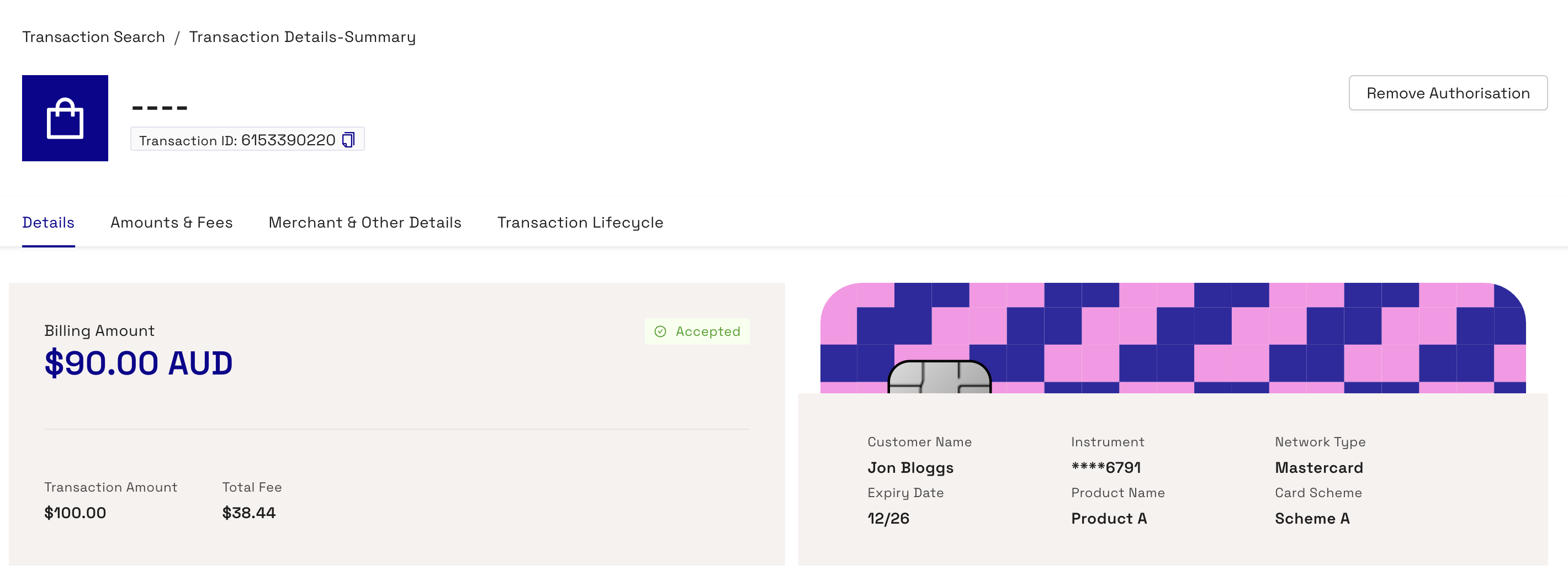
To view cardholder details, click on the image of the card.
The following table describes each of the fields in the Details tab.
|
Field |
Description |
|---|---|
|
Billing Amount |
Bill amount (in the currency of the card). |
|
Transaction Amount |
Transaction amount (in the transaction currency). |
|
Total Fee |
The accumulated total fee for the transaction. This includes any MCC Padding, FX Padding, Fixed and Rate fees. |
|
Customer Name |
The name of the cardholder. |
|
Instrument |
The last eight characters of the masked PAN. |
|
Network Type |
The network associated with the card on the transaction. For example, Visa, Mastercard, or Discover Global Network (DGN). |
|
Expiry Date |
The expiry date of the card. |
|
Product Name |
The product name the card is associated with. |
|
Card Scheme |
The scheme the card is associated with. For example, Mastercard or Visa. |
|
Transaction Date |
Date and time the transaction occurred. The time relates to where the Thredd servers are located, for, GMT time zone for the UK. |
|
Transaction Type |
Type of transaction, such as authorisation, balance adjustment, presentment, and auth reversal. |
|
Transaction Status |
Transaction status, such as Settled. |
|
Response Status (DE039) |
The response code that Thredd provided back to the scheme. |
|
Transaction Amount (DE004) |
Transaction amount (in the transaction currency). |
|
Billing Amount(DE006) |
Bill amount (in the currency of the card). |
|
Settlement Amount(DE005) |
Settlement amount and currency. |
|
Blocked Amount |
Blocked amount (pending payments) after the transaction. |
|
Available Balance |
Available balance after the transaction. |
|
Actual Balance |
Actual balance after the transaction. |
|
Processing Code |
Transaction processing code, for example, recurring fees, balance inquiry. |
|
Transaction Note |
Note for the transaction. Notes are taken from transaction details appended during each type of transaction. For example, for declined transactions, there could be text explaining why the transaction was declined. The Notes field is a useful source of information about a transaction, particularly for declines, as it can identify the reason. For example, in the case of a decline, an incorrect PIN or the transaction exceeding the maximum permitted limit. Scroll right on the View Transactions screen to display it. |
8.2 Amounts & Fees Tab
The Amounts & Fees tab contains details on the fees associated with the transaction.
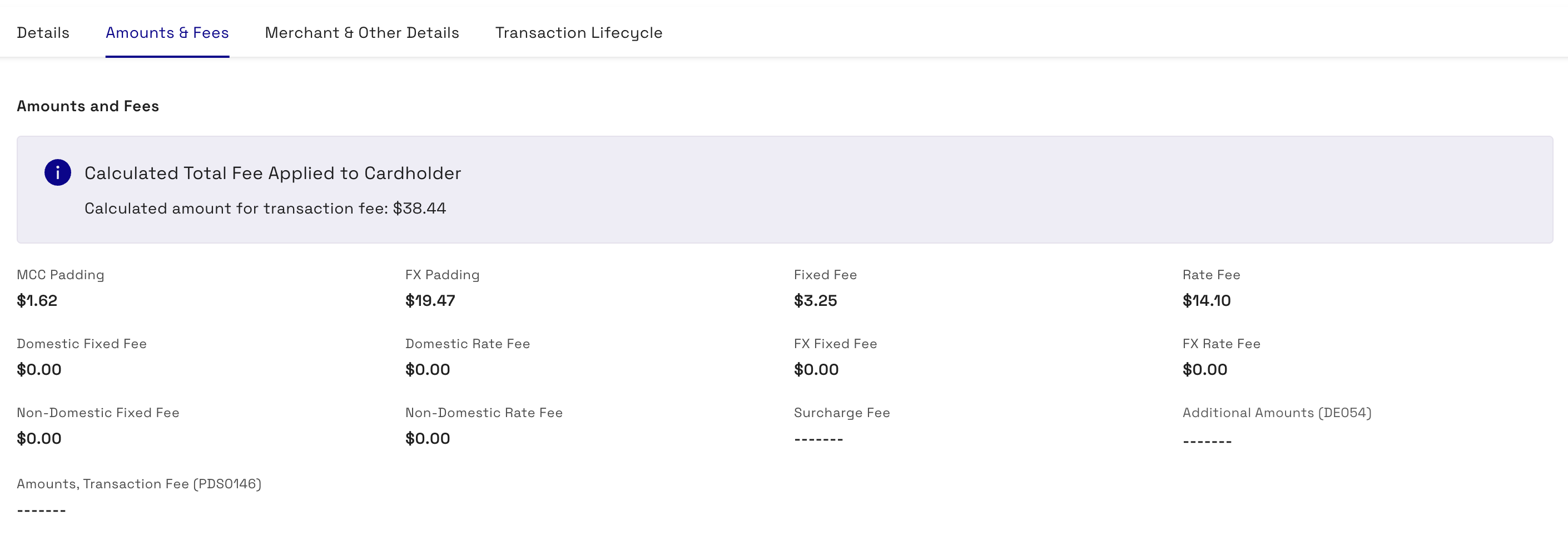
|
Field |
Description |
|---|---|
|
Calculated Total Fee Applied to Card Holder |
The combined value of all fees related to the transaction. |
|
MCC Padding |
Financial padding applied to transactions in specific MCCs (typically used for hotels and rental cars where cardholders might be charged a little more than authorised for). |
|
FX Padding |
Financial padding (to allow for currency fluctuations). |
|
Fixed Fee |
Fixed fees levied against the transaction based on specific amounts. |
|
Rate Fee |
Rate-based fee. Fees levied against the transaction based on a percentage charge. |
|
Domestic Fixed Fee |
Fixed amount to apply as a fee to a domestic transaction. |
|
Domestic Rate Fee |
Percentage of the domestic transaction amount to apply as a fee. |
|
FX Fixed Fee |
Fixed amount to apply as a fee to an FX transaction. |
|
FX Rate Fee |
Percentage of an FX transaction amount to apply as a fee. |
|
Non Domestic Fixed Fee |
Fixed amount to apply to the transaction for non-domestic transactions. |
|
Non Domestic Rate Fee |
Percentage of a non-domestic transaction amount to apply as a rate fee. |
|
Surcharge Fee |
The surcharge fee for the transaction. |
|
Additional Amounts (DE054) |
Contains additional amount information for the transaction, if relevant. For example, for purchase with cashback transactions, the additional amounts field is present with the cashback amount. For more information, see Additional Amount field in the EHI Guide. |
|
Amounts, Transaction Fee (PDS0146) |
This is a specific data field used in Mastercard’s IPM (Interchange Processing Module) clearing file format. The fee carries one or more transaction-fee amounts associated with a Mastercard clearing record. |
8.3 Merchant & Other Details Tab
The Merchant & Other Details tab describes information on the merchant for the transaction, and other details associated with the transaction. The tab is split between two sections - a Merchant Details section, and an Other Details section.
8.3.1 Merchant Details
The Merchant Details section describes information on the merchant involved in the transaction.
Merchant Details only displays for Authorisation, Auth Reversal, Auth Advice and Presentment transaction types.
|
Field |
Description |
|---|---|
|
Merchant Name |
The name of the merchant. |
|
City |
Where applicable, the city where the transaction took place. |
|
County |
Where applicable, the county where the transaction took place. |
|
Postcode |
Where applicable, the postcode where the transaction took place. |
|
Region |
Where applicable, the region where the transaction took place. |
|
Street |
Where applicable, the street where the transaction took place. |
|
Phone |
The Merchant telephone number. Can include non-digits. For example, "+18001112345" |
|
Merchant Website |
Where applicable, the website of the merchant for the transaction. |
|
Contact |
The Merchant contact details. For example, a phone number or email address. |
|
POS Entry Mode (DE022) |
How the transaction was created, for example, contactless at a machine, ecommerce, online, ATM. ICC indicates the card was physically inserted into a machine and the PIN entered. |
|
Card Acceptor Name Location (DE043) |
Identifies the card acceptor (such as merchant, ATM owner, or financial institution) and the point of interaction for the transaction. |
|
Till Time |
Time of the transaction as provided by the merchant on the customer’s receipt. This value may differ from the time when the transaction is processed. This is because the transaction might be processed in a different time zone. |
|
Merchant Category Code (MCC) |
Code that describes a merchant's primary business activities. For a full list of available MCCs, see Merchant Category Codes in the EHI Guide. |
|
POS Data (DE061) |
For Mastercard authorisation-related messages: This holds additional POS condition codes. For more information, see POS_Data_DE61 field in the EHI Guide. For Visa Authorisation-related messages: this is empty. For Financial and all other messages: this is empty |
|
Card Acceptor ID Code (DE042) |
Code relating to the specific Point of Sale (POS) terminal. |
|
Card Acceptor Terminal ID (DE041) |
Uniquely identifies the terminal which accepted the card. Always present if the card data was read by a terminal. |
|
AID |
The Acquiring Bank ID as assigned by the network. Note that the format differs depending on whether this is an Authorisation or a Financial type message. For Authorisation messages:
For Financial messages:
|
8.3.2 Other Details
The Other Details section describes a variety of different fields related to the transaction.
Other Details only displays for Authorisation, Auth Reversal, Auth Advice and Presentment transaction types.
|
Field |
Description |
|---|---|
|
Message Type |
The type of transaction, such as an authorisation or presentment. |
|
STAN (DE011) |
System Trace Audit Number. This links the authorisation and presentment (note this number is not unique). |
|
Processing Code |
Transaction processing code, for example, recurring fees, balance inquiry. |
|
Transaction ID |
Identifier for tracing a specific transaction and narrowing a search. This is a unique identifier generated by Thredd to help identify and search for transaction in the Thredd platform. |
|
Transaction Originating Institution |
The merchant or store where the transaction was made. |
|
Document Reference (DE037) |
The number supplied by Thredd. Retains the original source document of the transaction and assists in locating the source document. |
|
Authorisation Code |
Authorisation code generated by Thredd for approved and declined authorisation requests. |
|
Additional Response Data (DE044) |
Response data for transactions where the content can differ depending on the network. For example, for Mastercard, the details it provides depends on the response code only (where it is only populated in the case of a decline). For payment networks such as Visa, this field includes the response for transaction data validations. For more information, see Visa_ResponseInfo_DE44 in the EHI Guides. |
|
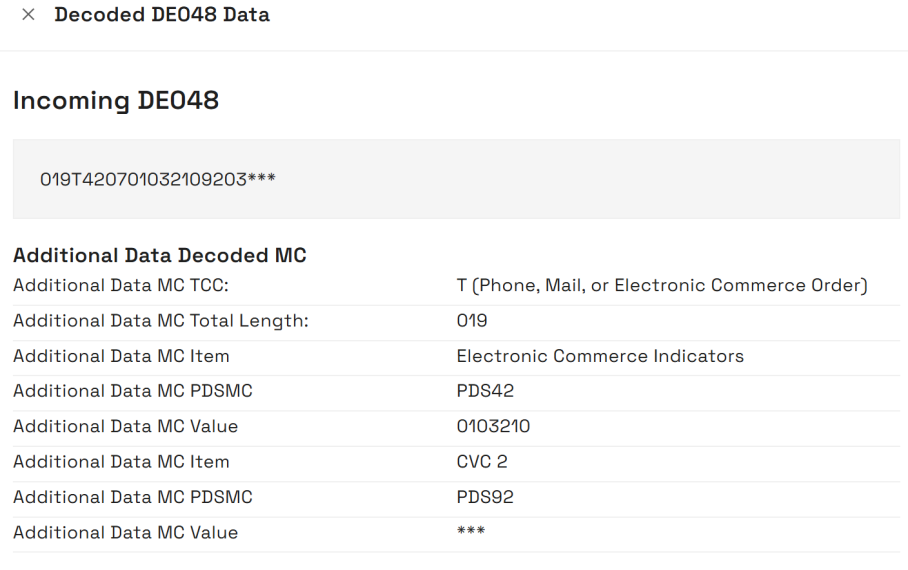
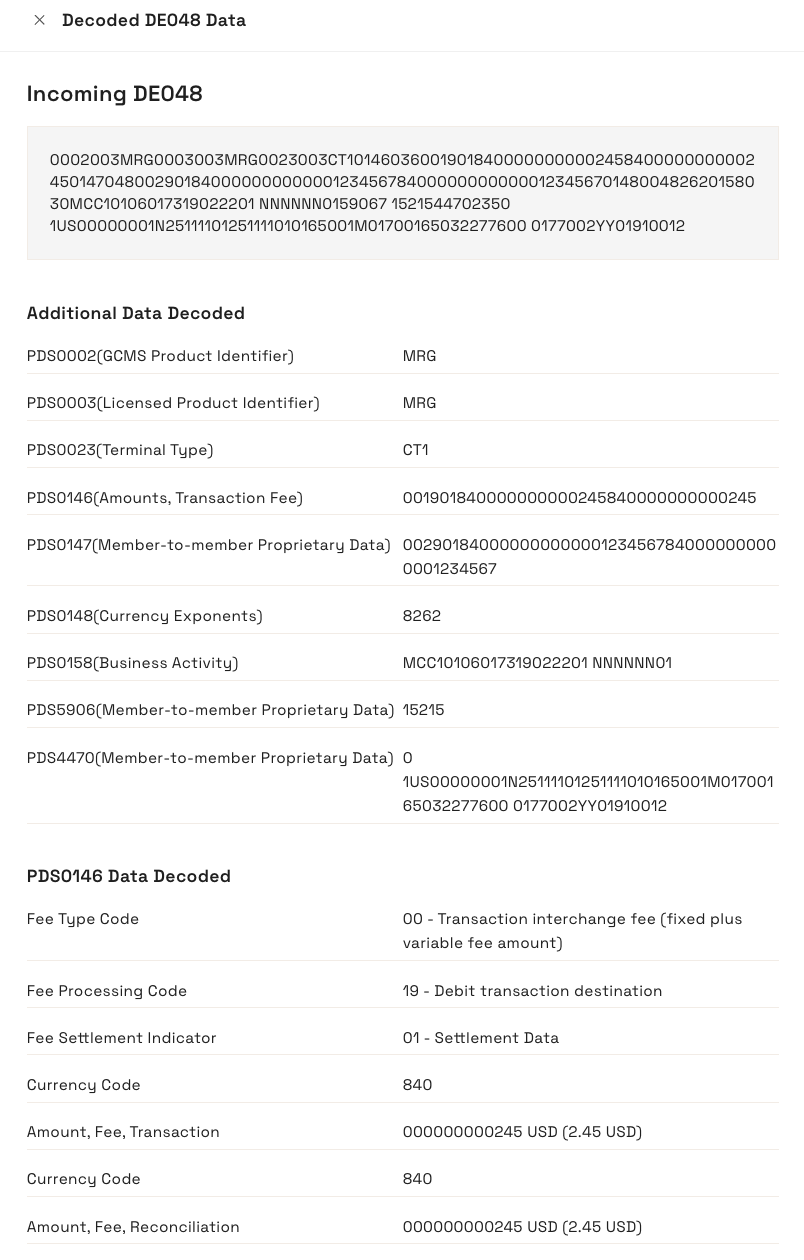
Additional Data (DE048) |
This is extra details on a transaction, which you should not use unless agreed with Thredd. The following images shows an example for authorisation and presentments:
|
|
AVS Response |
The Address Verification Service (AVS) response to the transaction. This verifies the cardholder in order to avoid fraudulent transactions by comparing the address input by the cardholder against the address on file. |
|
Expiry Date |
The expiry date provided at the time of the transaction (useful to check in case the cardholder has entered an incorrect expiry date). |
|
FID |
Forwarding Institution Identification Code. Identifies the acquiring institution forwarding a Request or Advice message. |
|
Thredd POS Data |
Information on the transaction at the POS terminal, including details such as how the transaction was authenticated, the cardholder present/not present status and fraud details. Click the expand button to display the Thredd POS Data Decoded Values. The following fields display.
|
|
Network ID |
Also known as DE48, this a unique transaction number that is generated by the payment network for linking authorisations and presentments. |
|
Acquirer Reference Data |
Acquirer Reference Number/Data. ISO 8583 field 31. The acquirer reference number exists for clearing messages only (Financial advices/notifications, and Chargeback advices/notifications (and reversals of)). |
|
ICC Data (DE055 - 0100) |
Data from the card’s chip. |
|
Advice Reason Data |
Mastercard Authorisation Advice Reason Code. Explains why Mastercard Stand-In processing (STIP) occurred or why an advice was created. This field will only be present for transactions received by Thredd from Mastercard. |
|
Tax ID |
The merchant's Tax ID (from Base II TCR6 31-50 (len 20), Mastercard GCMS - from IPM DE48 PDS 596 subfield 1) is the unique code assigned to a business by the processor or acquiring bank. |
|
Record ID |
A unique Thredd identifier used to link transactions to other tables in the Thredd database. |
|
Payment Token ID |
Unique Thredd identifier of the payment token. Only present if transaction relates to a payment token (for example, Apple Pay). |
|
Network Data |
Also known as DE48, this a unique transaction number that is generated by the payment network for linking authorisations and presentments. |
8.4 Transaction Lifecycle Tab
The Transaction Lifecycle tab displays details on each of the steps in the lifecycle of the transaction.
The following table describes each of the fields in the Transaction Lifecycle tab.
|
Field |
Description |
|---|---|
|
Transaction Lifecycle ID |
The unique transaction lifecycle identifier. |
|
Transaction Type |
Type of transaction, such as authorisation, balance adjustment, presentment and auth reversal. |
|
Date |
Date and time the transaction occurred. The time relates to Thredd time. For example, if the servers for processing Thredd transactions are in the GMT time zone, the Thredd time is GMT |
|
Status |
Transaction status, such as Settled. |
|
Transaction Amount |
Transaction amount (in the transaction currency). |
|
Billing Amount |
Bill amount (in the currency of the card). |
8.5 Remove Transaction Authorisation
In some instances, you may want to remove an authorisation on a transaction if the authorisation is no longer required. The Remove Transaction Authorisation functionality enables you to remove an authorisation from a transaction. This functionality is only enabled for Authorisation transactions. If the transaction is anything else then the button is disabled.
Removing an authorisation does not prevent the associated presentment from being received for this transaction. If a presentment is received Thredd will still process this.
To remove an authorisation from a transaction:
-
Click Remove Authorisation to open the Remove Transaction Authorisation window.
-
Enter any notes related to the removal of the authorisation in the Notes field.
-
Click Save to remove the authorisation from the transaction.
The window closes and the authorisation is removed from the transaction.